OBS Studio vs Streamlabs Desktop: which should you use?
Both are free to download, both stream to Twitch, YouTube and Kick, and Streamlabs Desktop is built on OBS’s own engine. So what’s the difference? In short: OBS Studio is lighter and more flexible; Streamlabs Desktop puts alerts, themes and widgets in one app, at the cost of more of your PC and a paid plan for some features.
| OBS Studio | Streamlabs Desktop | |
|---|---|---|
| Price | Free and open source, no account | Free, with a paid Ultra plan for extra themes, apps and multistreaming |
| Systems | Windows, macOS, Linux | Windows, macOS |
| Performance | Lighter on CPU and memory | Heavier, because widgets and the dashboard run inside it |
| Alerts and widgets | Added as browser sources (StreamElements, Streamlabs, Scenqo) | Built in, signed in with your Streamlabs account |
| Themes and overlays | Bring your own: browser sources, images, scene-collection imports | Theme library inside the app, plus your own browser sources |
| Plugins | Large plugin library (vertical canvas, multistream, effects) | Its own app store; most OBS plugins don’t install |
| Updates | New OBS features arrive first | Follows OBS, sometimes later |
Choose OBS Studio if…
- Your PC is mid-range and every frame matters while gaming.
- You want plugins: a vertical canvas, multistreaming, advanced audio.
- You stream on Linux.
- You’re happy to add alerts as one browser source (it takes five minutes).
Choose Streamlabs Desktop if…
- You want everything in one window on your first day: alerts, chat, themes, tipping.
- Your PC has power to spare.
- You plan to pay for its extras anyway.
Our answer
Start with OBS Studio unless you have a reason not to. It’s lighter, it can do everything Streamlabs Desktop does with a browser source or two, and nothing in it is behind a subscription. If you already use Streamlabs Desktop and it runs well, there’s no need to switch.
Scenqo works in both
Every Scenqo scene is a browser source, so it works the same in either app: paste the link, set the size, tick the right boxes.
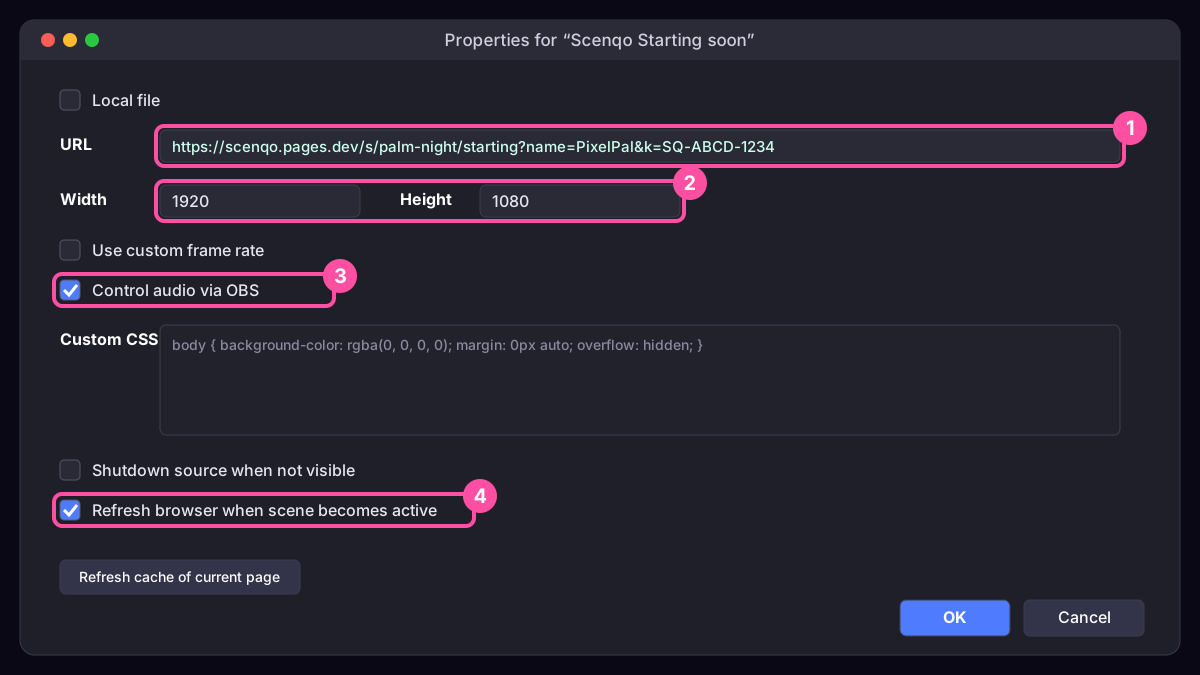
OBS users can import our scene-collection file and have every scene ready at once (how). Streamlabs users add each link as a Browser Source (how). Our alert sounds go into either a StreamElements AlertBox or the Streamlabs Alert Box.
Switching later
Going from OBS to Streamlabs Desktop: Streamlabs offers to import your OBS scenes when you install it. Going the other way, copy each browser source’s link from Streamlabs and paste them into OBS, or re-download your Scenqo scene collection.
Scenqo packs are animated scenes you paste into OBS as links, with matching alerts, panels and a transition. First Light is free.